
v1.4.6.0 Update Notes
Modifications on Daily Routines
Section titled “Modifications on Daily Routines”- The path to the default fonts was adjusted. Now it would be that to Dalamud fonts instead of
Microsoft YaHei. - The logic of the floating window of module configurations was optimized.
- New command
/pdr toggleconfig <module internal name>, to display or hidden the floating window of the module configurations. - The overall font size was reduced.
New modules
Section titled “New modules”Automatic use of the Earth’s Reply [Action] (Would be called as “Auto Earth’s Reply” after next update)
Section titled “Automatic use of the Earth’s Reply [Action] (Would be called as “Auto Earth’s Reply” after next update)”After using the skill Riddle of Earth in a PVP zone, automatically use the skill Earth’s Reply when its duration is about to end to prevent it from expiration.

Auto remove animation lock on skills [Action]
Section titled “Auto remove animation lock on skills [Action]”Automatically remove the 100ms animation lock that is added to all skills after use, and automatically block the mandatory animation lock data packets sent by the server to improve the smoothness of using and weaving various skills.

启用前
启用后
Auto Lucid Dreaming [Action]
Section titled “Auto Lucid Dreaming [Action]”If the current job can use Lucid Dreaming and is not a Black Mage, automatically use Lucid Dreaming when MP falls below the specified threshold.

The Praetorium Assist [Assistance]
Section titled “The Praetorium Assist [Assistance]”After entering the duty “The Praetorium” and mounting the magitek reapers, the module will shot the Magitek Cannon towards the optimal AOE position nearby.

Module modifications
Section titled “Module modifications”Party Finder Filter
Section titled “Party Finder Filter”- The entire module including the feature and the interface was completely refactored.
- New category
High-end duty recruitment filter, to provide more refined filters like job/class specifications for high-end raids.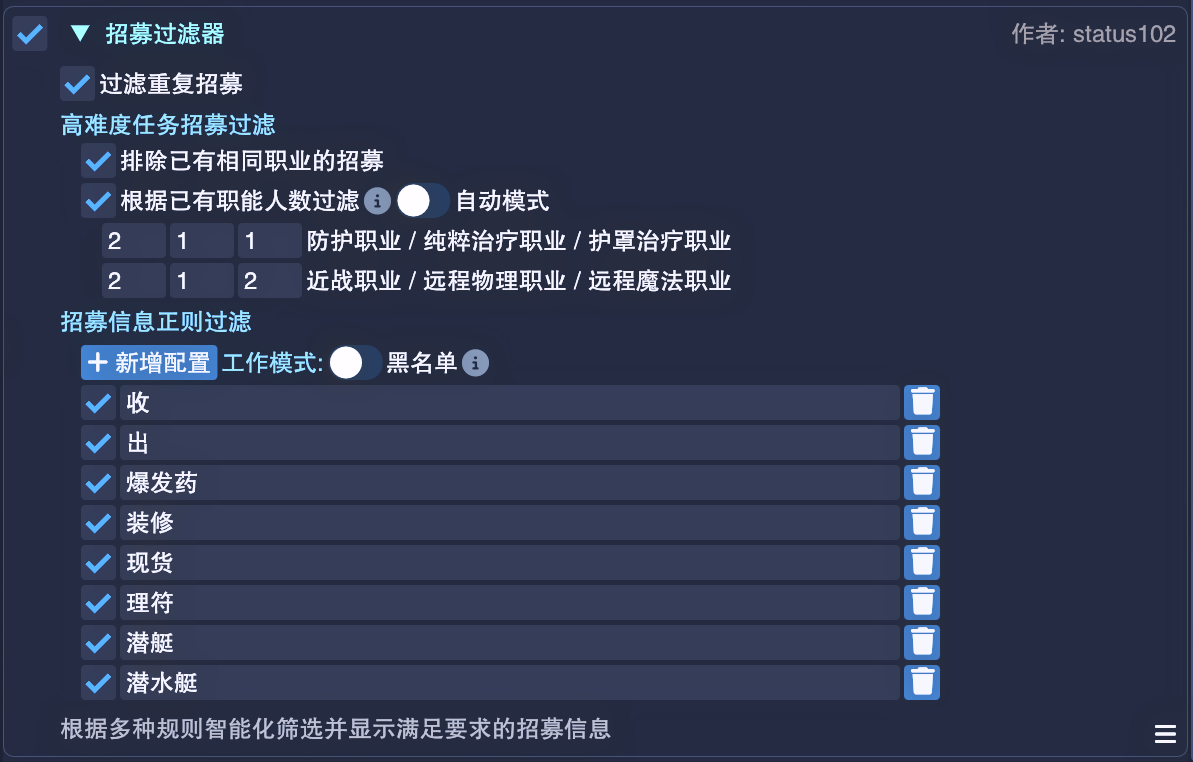
- Now the floating window of the configurations would pop up automatically once the user is checking Party Finder.
Duty Finder Command
Section titled “Duty Finder Command”- Now the duty names contain spaces could be processed properly.
Fast Object Interaction
Section titled “Fast Object Interaction”- The logic and the code were completely refactored.
- The performance was improved.
- The drawing logic of the configuration interface was optimized.
- The judgement of whether an object is in the view range is now more accurate while enabling
Only display objects in view range. - The floating window will resume earlier than before after leaving a combat or switching zones.
Quick Chat Panel
Section titled “Quick Chat Panel”- The drawing logic of the configuration interface was greatly optimized.
- An issue that certain buttons may disappear in the floating window after switching to some tabs has been fixed. The buttons will always be displayed.
- The memory usage and the search efficiency of the
Game itemstab were improved.