
v1.7.0.0 Update Notes
Modifications on Daily Routines
Section titled “Modifications on Daily Routines”- An issue that the font build in game may not take effect has been fixed.
- Auto reload was added to the data with multi-language localization.
New modules
Section titled “New modules”Auto Display Main Scenario Quest Progress [General]
Section titled “Auto Display Main Scenario Quest Progress [General]”If there’re main scenario quests to be completed, display the number of remaining main scenario quests and the progress percentage in the Main Scenario Guide interface.

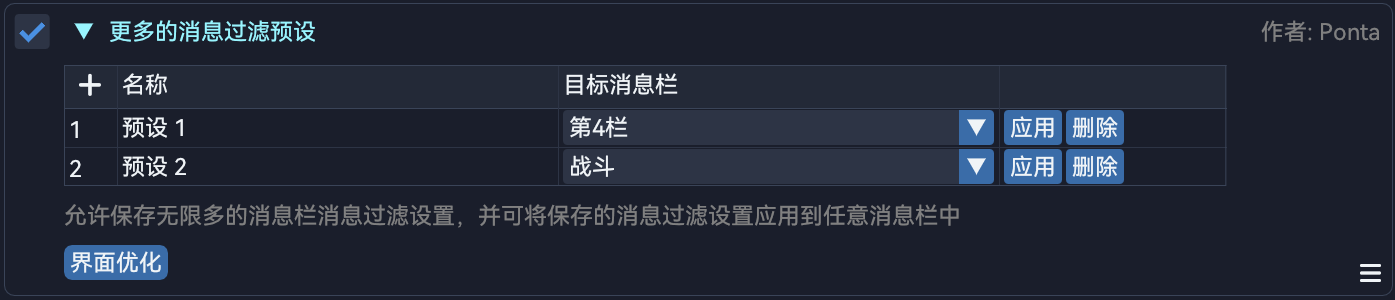
More Chat Log Filter Presets [UI_Optimization]
Section titled “More Chat Log Filter Presets [UI_Optimization]”Allows the user to save an unlimited number of chat log filter presets and to apply filters to any chat tabs.
Auto Accelerate Gathering [System]
Section titled “Auto Accelerate Gathering [System]”If the current job is Miner or Botanist, all the action locks after performing gathering actions will be removed during gathering in order to accelerate the process. The module will keep the efficiency in check to prevent from being forced to disconnect by the server.

Auto Cancel Fishing Animations [System]
Section titled “Auto Cancel Fishing Animations [System]”All the action locks after performing fishing actions will be removed in order to improve the efficiency.

Modules removed
Section titled “Modules removed”Auto Cancel Gathering Animations [System]
Section titled “Auto Cancel Gathering Animations [System]”- The module was separated into two modules,
Auto Accelerate GatheringandAuto Cancel Fishing Animations.
Module modifications
Section titled “Module modifications”Auto Cancel NPC Emotes [System]
Section titled “Auto Cancel NPC Emotes [System]”- An issue that the module didn’t work has been fixed.
Auto Cancel NPC Fade-in And Fade-out [System]
Section titled “Auto Cancel NPC Fade-in And Fade-out [System]”- An issue that the module didn’t work has been fixed.
Auto Cancel NPC Turn And Sight Adjustments [System]
Section titled “Auto Cancel NPC Turn And Sight Adjustments [System]”- An issue that the module didn’t work has been fixed.
Auto Check Item Level [Combat]
Section titled “Auto Check Item Level [Combat]”- An issue of null reference exceptions has been fixed.
Auto FATE [Script]
Section titled “Auto FATE [Script]”- Two missing prerequisite modules were supplemented.
- Instance switching logic was added to the mode
Single Area. - An issue that, the character may get stuck after a FATE ends while holding the Gemstone up status and being attacked by non-FATE monsters simultaneously, has been fixed.
- The operation that the character quickly joins and leaves a duty was streamlined.
- An issue that the character may get stuck if the character dies during the operation of quickly joining and leaving a duty has been fixed.
- The logic of mounting was optimized to avoid operation races.
- Now
the Forlornwill only be attacked while there’re other players around, in order to prevent from spending too much time while fighting alone.
Auto Gil Trade [General]
Section titled “Auto Gil Trade [General]”- An issue may crash the game during the initialization has been fixed.
Auto Repair [General]
Section titled “Auto Repair [General]”- The logic was adjusted and the compatibility was improved.
Auto Duty Commence [UI_Operation]
Section titled “Auto Duty Commence [UI_Operation]”- An issue that the module will repeatedly try to click the button while the character is unable to commence the duty has been fixed.
Auto Display Mitigation Details [Combat]
Section titled “Auto Display Mitigation Details [Combat]”- The drawing of the shield amount and the mitigation percentage in the party list was optimized.
Better Enmity List [UI_Optimization]
Section titled “Better Enmity List [UI_Optimization]”- The overall performance was improved.
- The targets which have full HP and are not targetable are not identified as irrelevant targets, their HP and enmity will not be displayed.
Better Market Board [UI_Optimization]
Section titled “Better Market Board [UI_Optimization]”- Now users could search by Pinyin.
- Now users could search by Item Level.
- Now users could switch to the high-quality only mode by right clicking item entries.
- Taxes will be displayed if an item is from the current server.
- An issue that some market data from the current server may be omitted has been fixed.
Auto Discard Items [General]
Section titled “Auto Discard Items [General]”- The logic was adjusted and optimized.
Quick World Travel Command [System]
Section titled “Quick World Travel Command [System]”- The status of Playing Recorded Duty is not ignored.
Expanded Player Right-click Menu Search [UI_Optimization]
Section titled “Expanded Player Right-click Menu Search [UI_Optimization]”- Two outdated logic of checking target players were updated.
- Now the options to search in external websites are enabled by default.
- New website search option
SuMemo, to search in the websiteSuMemowhich is fully supported by Daily Routines data collections.
Auto Hunt Mobs Finder [Script]
Section titled “Auto Hunt Mobs Finder [Script]”Scan Hunt Mobsno longer requires a test qualification. The scanning method will be determined automatically based on the current server, the current data center and the permissions belong to the tester qualification code.- Now the module requires the Dalamud plugin
vnavmeshto work. - The logic of interface drawing was optimized.
- The option
Auto Switching Instancewas removed. - The
Mob Rank To Be Scannedin the scanning settings will be memorized. - Now users could select zones belong to certain game expansions by clicking the corresponding version number in
Zone To Be Scanned. - The performance of scanning was improved.
Quick Instance Switching Commandis now a prerequisite modules.- An issue of resources remained after scanning has been fixed.
- An issue that the names of hunt mobs were displayed in the table of
Nearest Aetheryterather than the name of Aetherytes has been fixed. - The logic of
Teleport To The Corresponding Zonewas optimized. - Since the floating window was added in previous versions, the command
/pdrmfis now to openOpen Mini Hunt Train Helperinstead of the configuration interface. - The option
Teleport And Instantly Move To The Mob Positionwas removed. - The real-time routes and the spawn position previews were added to
Scan Hunt Mobs.
Frontline Player Radar [Combat]
Section titled “Frontline Player Radar [Combat]”- Now the module is working in
The Borderland Ruins (Secure).
Auto Open Treasure Coffers [Combat]
Section titled “Auto Open Treasure Coffers [Combat]”- The logic was optimized.
Auto Speed Multiplier [System]
Section titled “Auto Speed Multiplier [System]”- New multipliers under various circumstances, including
During Combat In A Duty、Default In A Duty、During Combat But Not In A Duty、During Combat But Not In A Duty和Default.
Auto Cosmic Fortune [UI_Optimization]
Section titled “Auto Cosmic Fortune [UI_Optimization]”- An issue that the configuration
Number Of Rollsdidn’t work has been fixed.
Auto Unlock All Duties [UI_Optimization]
Section titled “Auto Unlock All Duties [UI_Optimization]”- Now the module could unlock recruitment categories which were unlocked after certain quests.