
v2.0.6.0 Update Notes
Framework Modifications
Section titled “Framework Modifications”- An issue of being unable to access
The Firmamentin some automated processes has been fixed. - An issue of abnormal rendering when the height of module configurations exceeds a certain threshold after expanding has been fixed.
- An issue that the auto-update feature didn’t work has been fixed.
- Connection to Universalis has been improved.优化了插件内相对于 Universalis 的连接效果
New Modules
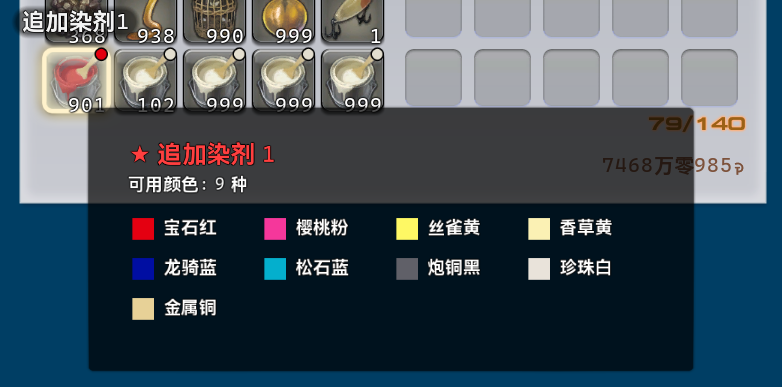
Section titled “New Modules”Auto List Dye Colours [UI_Optimization]
Section titled “Auto List Dye Colours [UI_Optimization]”Recommended Module
Automatically list all the available colours belong to the dye while hovering over.

NVIDIA DLSS Identifiable Client [System]
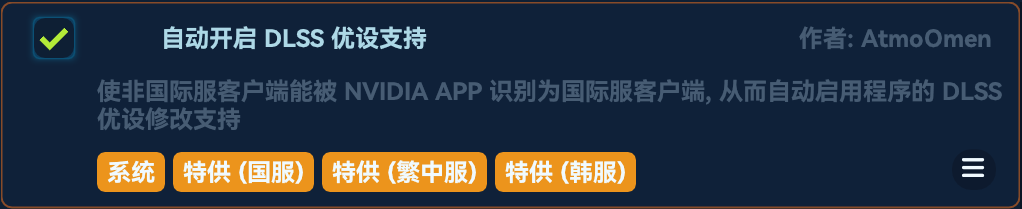
Section titled “NVIDIA DLSS Identifiable Client [System]”Make non-global clients (in other words, non-NA/EU/JP/OCE clients) identifiable for the DLSS optimization feature in NVIDIA App, allowing users to enable DLSS optimization for the client.
Removed Modules
Section titled “Removed Modules”Higher Quick Synthesis Cap [System]
Section titled “Higher Quick Synthesis Cap [System]”The module has been merged into the module Better Crafting Log.
Module Modifications
Section titled “Module Modifications”Instant Logout Or Exit [System]
Section titled “Instant Logout Or Exit [System]”- The module title has been adjusted. The previous title was
Instant Logout. - Now the module would work on all the following scenarios:
- Clicking
Exit Gamein the title screen. - Ending the process via the title bar of the game window.
- Clicking
Exit Gamein System Menu of the game. - Ending the process via the task bar.
- Clicking
- The module is now a
recommended module.
Auto Fishing Status Persist [System]
Section titled “Auto Fishing Status Persist [System]”- The title, description and internal name of the module have been adjusted. The previous title was
Block Input During Fishing. Users are required to re-enable the module after the update. - The implementation has been fully refactored, adopting a more underlying logic.
Auto Block Unnecessary Pop-ups [UI_Optimization]
Section titled “Auto Block Unnecessary Pop-ups [UI_Optimization]”- The blocking effect has been improved.
- More unnecessary pop-ups have been blocked.
Auto Confirm Materia Melding And Retrieval [General]
Section titled “Auto Confirm Materia Melding And Retrieval [General]”- The melding efficiency has been improved.
Auto Check Item Level [Combat]
Section titled “Auto Check Item Level [Combat]”- An issue that the module would work in Duty Recorder has been fixed.
Better Reward Interface [UI_Optimization]
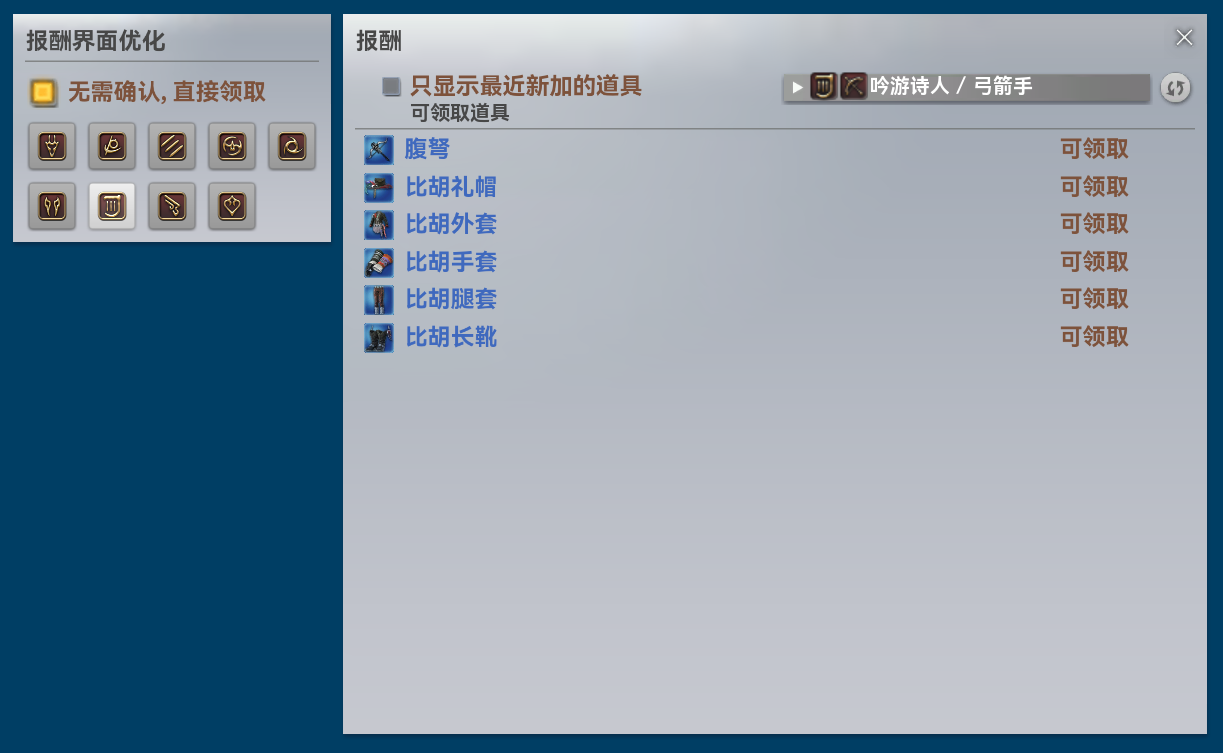
Section titled “Better Reward Interface [UI_Optimization]”- The interface appearance and interaction animations have been fully refactored.
Better World Visit [System]
Section titled “Better World Visit [System]”- Now all the servers within a data center are sorted lexicographically.
Instant Character Acceleration [System]
Section titled “Instant Character Acceleration [System]”- The logic has been optimized and the compatibility has been improved.
Auto Confirm Quest Accepting [UI_Operation]
Section titled “Auto Confirm Quest Accepting [UI_Operation]”- An issue that the module didn’t work has been fixed.
- The interrupt hotkey would no longer work on the module.
Auto Skip Cutscenes [System]
Section titled “Auto Skip Cutscenes [System]”- Adaption work for Patch 7.5 has been introduced.
- Now the
inspectionanddart shootingscenarios could be automated or skipped. - More backup logic has been introduced to make sure the module work in all the applicable scenarios.
Better Market Board [UI_Optimization]
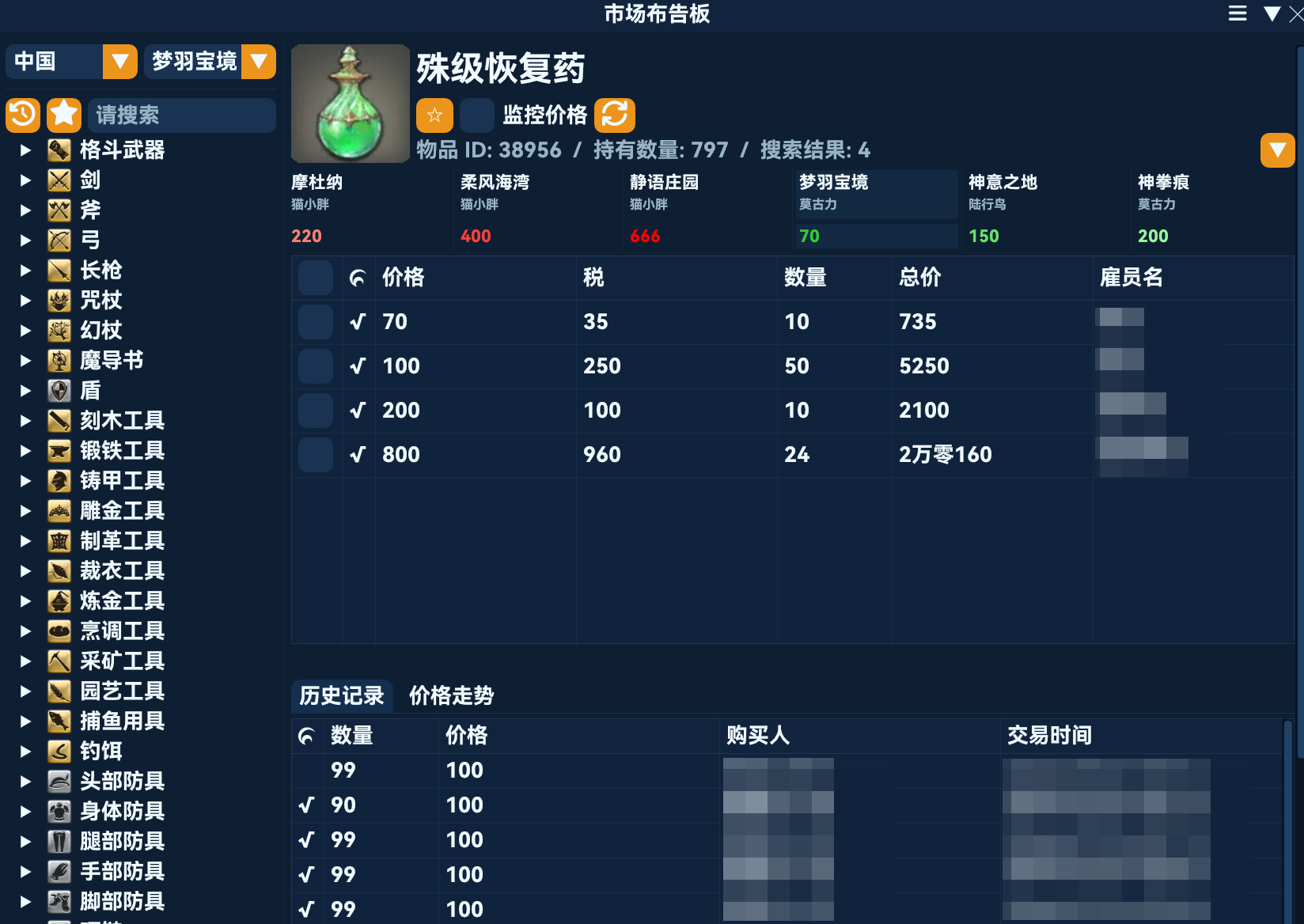
Section titled “Better Market Board [UI_Optimization]”- New UI component has been introduced, indicating the top three servers with the highest prices for the item and also the top three with the lowest prices.
- To access the full detailed price information across all the servers and data centers, click
Show Allin the upper right corner.
- To access the full detailed price information across all the servers and data centers, click
- New configuration option
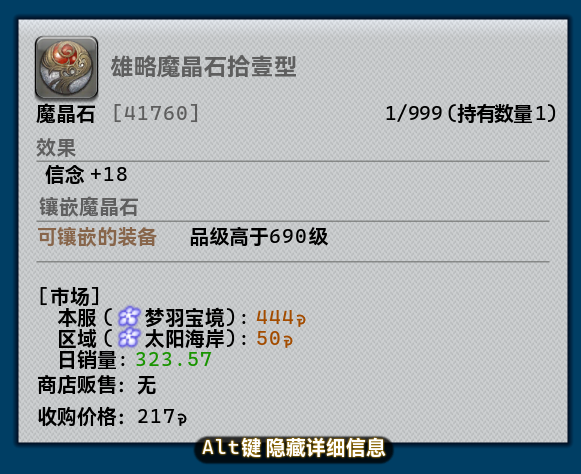
Market Data In Item Help, to display market data of the item provided by Universalis in the Item Help interface if an item is tradeable. Enabled by default.
- The
HQ-only filter could be enabled on the right. - An issue that some unexpected behaviours regarding
HQitems in Universalis mode has been fixed. - Now the status of the
HQ-only filter would persist regardless of the current item.
Better Crafting Log [UI_Optimization]
Section titled “Better Crafting Log [UI_Optimization]”- The following features no longer require the plugin
Raphael.Dalamud:- Showing the same recipe under other jobs
- Material source tracing
- Job switching
- Only one of the
Switch Jobbutton and the vanillaSynthesizebutton would present, depending on the circumstances. - The appearance of the feature
Same Recipe Under Other Jobshas been improved. The corresponding job name would present while hovering an icon. - The target job name would present while hovering over the
Switch Jobbutton. - All the features could be enabled or disabled separately in the configurations.
- New feature
Higher Quick Synthesis Cap, to increase the cap of quick synthesis from 99 to 255. Enabled by default. - New feature
Higher Quality Cap In Trial, to increase the quality cap in trial synthesis from a half of the corresponding recipe to full. Enabled by default.
Occult Crescent Helper [Assistance]
Section titled “Occult Crescent Helper [Assistance]”- The appearance of
Phantom Job Listhas been adjusted. - The word
Phantomhas been removed in job titles inPhantom Job Listfor a more spacious layout.
Auto Discard Items [General]
Section titled “Auto Discard Items [General]”- New IPC
DailyRoutines.Modules.AutoDiscard.EnqueueByItemscoming with parameterHashSet<uint> itemIDsand return valuevoid. A temporary list of items to be discarded could be passed in from outside.
Auto Clear Fishing Spot Alert [General]
Section titled “Auto Clear Fishing Spot Alert [General]”- The logic has been refactored.
- Global alert detection has been introduced. A notification would be sent if global alert has been triggered at a fishing spot.
- New configuration option
Logout After Global Alert. - Now
Instant Logout Or Exitis a prerequisite module.
Bait Switching Commands [Assistance]
Section titled “Bait Switching Commands [Assistance]”- An issue that the module didn’t work for
Swimbaithas been fixed.
Fast Ride Pillion [General]
Section titled “Fast Ride Pillion [General]”- The implementation has been adjusted, adopting a more agile approach.
Auto Expert Delivery [UI_Operation]
Section titled “Auto Expert Delivery [UI_Operation]”- An issue that the first call to
Quickly Exchange Seals For Itemsusually failed has been fixed.
Auto Gather In The Diadem [Script]
Section titled “Auto Gather In The Diadem [Script]”- An issue that the character may be unable to land after windmire travelling has been fixed.
Auto Item Desynthesis [UI_Operation]
Section titled “Auto Item Desynthesis [UI_Operation]”- An issue that the option
Desynthesize entire stack.were not enabled automatically has been fixed.
Disable Background Game Rendering [System]
Section titled “Disable Background Game Rendering [System]”- An issue that the module didn’t work has been fixed. The implementation has been refactored.
Quick Chat Panel [UI_Optimization]
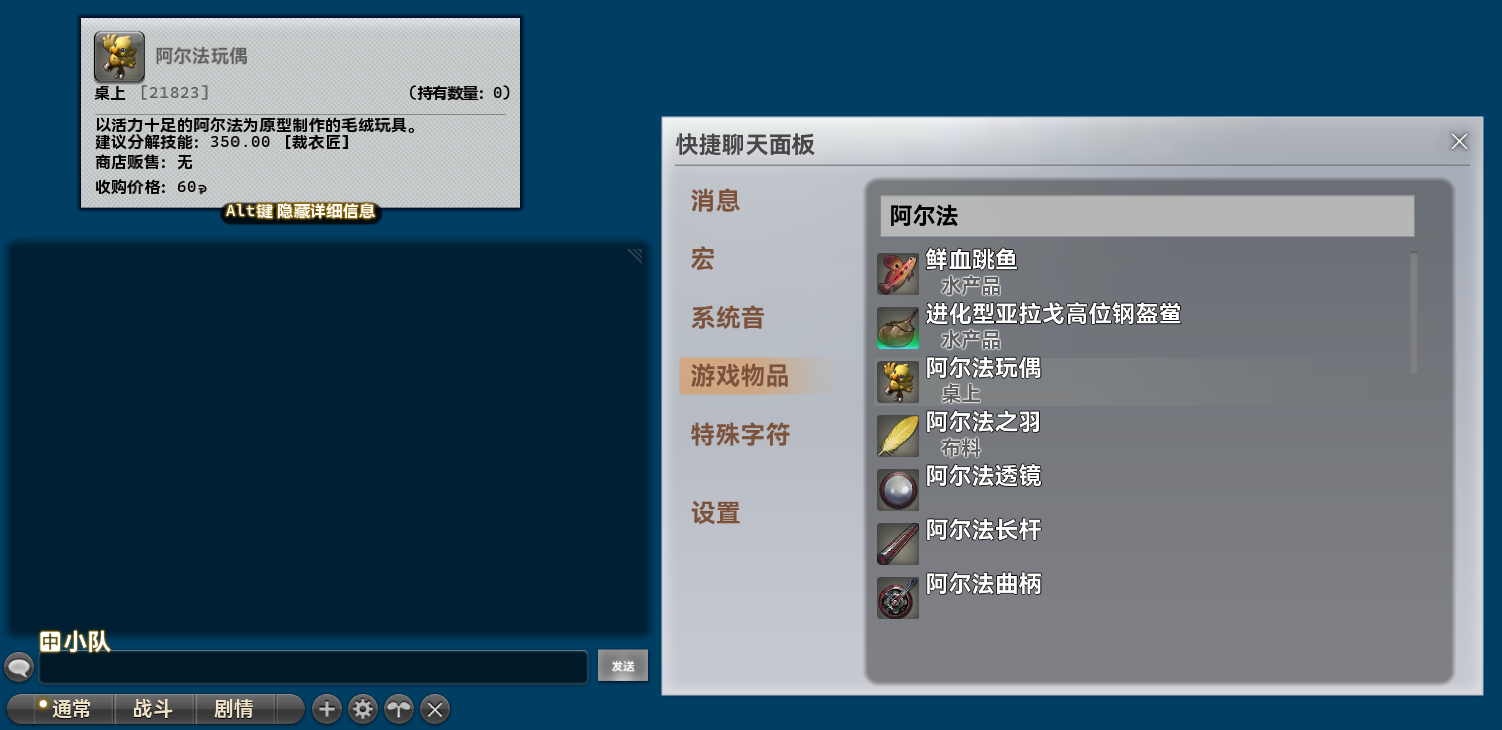
Section titled “Quick Chat Panel [UI_Optimization]”- The floating window has been fully refactored using vanilla assets instead of ImGui in the past.
- The configuration options
Window Height,Button Offset,Button Icon,Button BackgroundandFont Scalinghave been removed. - An issue of disordered
Special Icon Chardisplay has been fixed. - An issue of being unable to send Auto-translation Dictionary has been fixed.
Auto Display Available NPC Vendor [UI_Optimization]
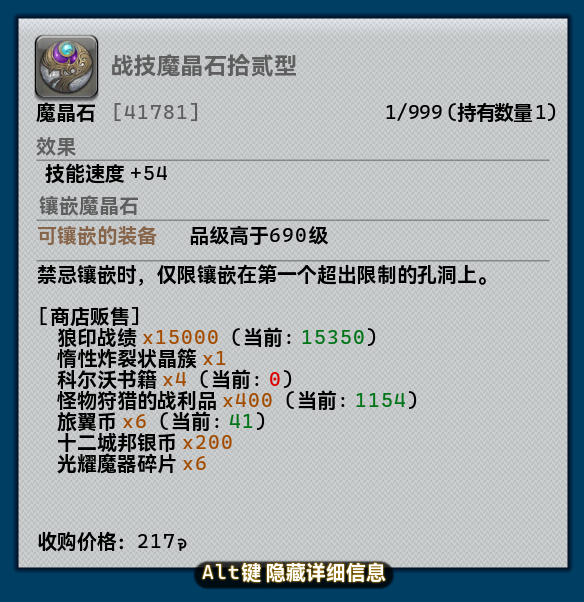
Section titled “Auto Display Available NPC Vendor [UI_Optimization]”- Detailed availability information is now provided in the tooltip.
Auto Sort Items [General]
Section titled “Auto Sort Items [General]”- An issue that the module didn’t work has been fixed.