我的 TTS (文本转语音) 启用之后仍然没有声音怎么办?
このコンテンツはまだ日本語訳がありません。
Q: 我的 TTS (文本转语音) 启用之后仍然没有声音怎么办?
Section titled “Q: 我的 TTS (文本转语音) 启用之后仍然没有声音怎么办?”A: 请先使用指令 /xllog 打开日志界面, 查找是否有形似如下的报错存在:
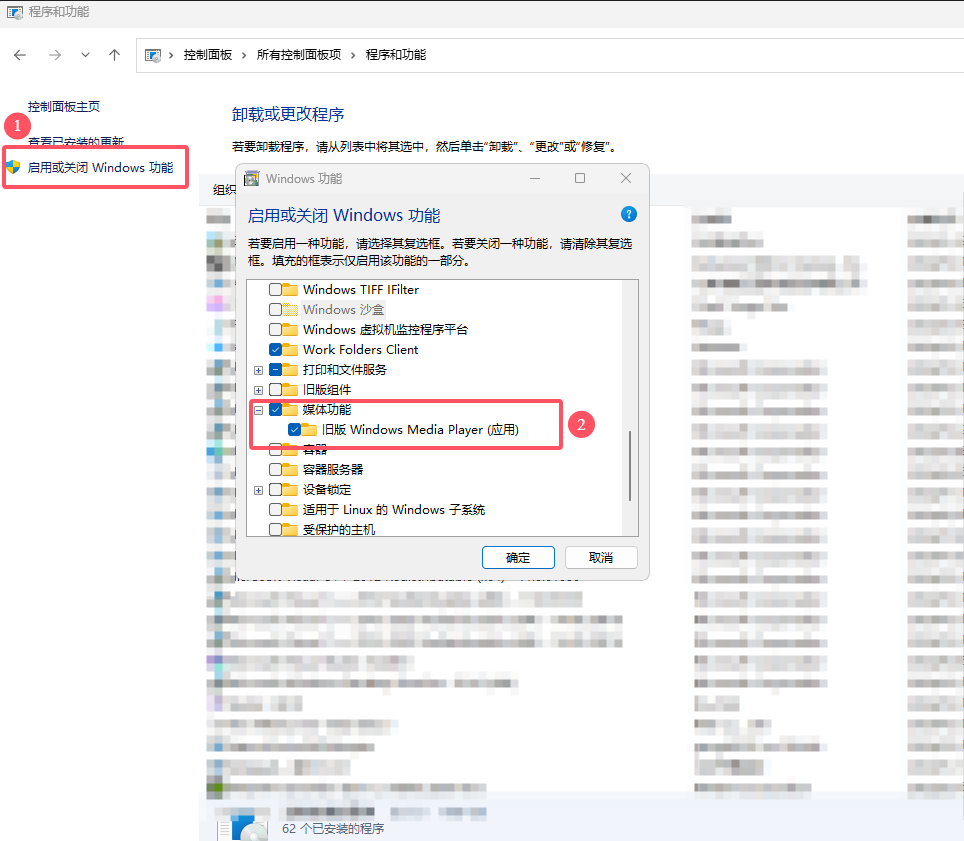
10:55:29.083 | ERR | [DailyRoutines] 处理 TTS 队列过程中发生错误:System.InvalidCastException: Unable to cast COM object of type 'System.__ComObject' to interface type 'WMPLib.WindowsMediaPlayer'. This operation failed because the QueryInterface call on the COM component for the interface with IID '{6C497D62-8919-413C-82DB-E935FB3EC584}' failed due to the following error: 库没有注册。 (0x8002801D (TYPE_E_LIBNOTREGISTERED)).如果存在, 则请自行搜索 如何安装 WMP 组件? , 然后按照搜索结果操作安装 Windows Media Player
若你的电脑显示已安装相关组件, 请遵循 卸载-安装-重启 的顺序操作, 然后打开插件查看问题是否解决